Bigsta: A Modern Handwritten Font for Web Design
As a web designer, I recently had the opportunity to test Bigsta, a modern and casual handwritten font, on a boutique online store project. The goal was to create a visually appealing and engaging user experience that would stand out in a crowded e-commerce space.
First Impressions with Bigsta
The first thing that struck me about Bigsta was its unique and friendly personality. This typeface has a natural, hand-drawn feel that adds a personal touch to any digital layout. I decided to use it in the hero section of the homepage, where it would be the first thing visitors would see.
Visual Characteristics and Style
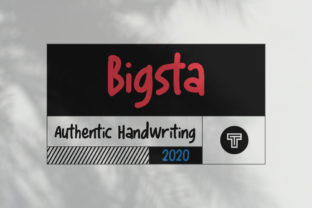
Bigsta is characterized by its flowing, organic lines and subtle variations in stroke width, which give it a dynamic and lively appearance. The font’s modern yet approachable style makes it perfect for creating a welcoming and trustworthy brand image. It’s not just a font; it’s a design element that can set the tone for the entire website.
Using Bigsta in Website Headers and Hero Sections
In the hero section, I used Bigsta for the main headline, "Discover Your Perfect Look." The font's bold and expressive nature made the text stand out beautifully against a high-contrast background image. This combination created a strong visual impact, drawing the user's attention immediately.
Readability and Visual Hierarchy
One of the key considerations when using a decorative font like Bigsta is readability. While it excels in large, prominent areas like headers and hero sections, it’s important to ensure that the text remains legible. I tested the font at various sizes and found that it works best for titles and short phrases, rather than longer paragraphs or body text.
Enhancing Brand Trust and User Engagement
For the boutique online store, Bigsta played a crucial role in building a polished and professional brand identity. The font’s modern and clean aesthetic helped to establish a sense of trust and quality, which is essential for an e-commerce site. Additionally, the unique character of the font added a touch of creativity and individuality, making the brand more memorable.
Font Pairing and Consistency
To maintain a balanced and cohesive look, I paired Bigsta with a simple sans serif font, such as Lato, for the body text. This combination allowed the handwritten font to shine in key areas while ensuring that the overall content remained easy to read and scan. The sans serif font provided a clean, modern backdrop that complemented the decorative nature of Bigsta.
Practical Tips for Using Bigsta
When using Bigsta in your web design projects, here are some practical tips:
- Test the font on different screen sizes, especially mobile devices, to ensure readability.
- Use Bigsta for hero titles, section headings, and call-to-action areas where it can make a strong visual statement.
- Consider the color and contrast of the background to enhance the visibility of the text.
- Check the included styles, weights, and alternates to find the perfect match for your design needs.
- Verify the font’s webfont availability and file formats to ensure smooth integration into your website.
- Review the commercial licensing options to ensure you have the right permissions for your project.
Final Thoughts on Bigsta
Overall, Bigsta is a versatile and visually appealing font that can add a unique and personal touch to any web design project. Whether you’re working on a creative portfolio, an online store, or a coaching website, this modern handwritten font can help you create a more engaging and memorable user experience. Just remember to balance its decorative nature with practical considerations like readability and consistency to achieve the best results.